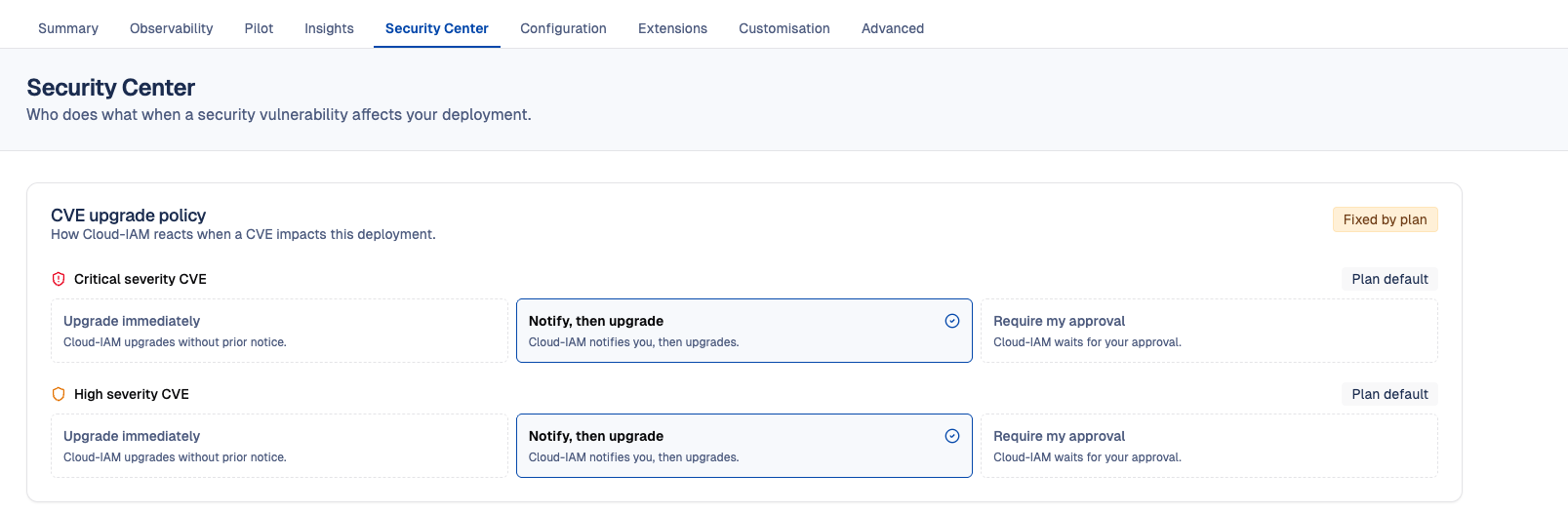
Security Center
The Security Center gathers, for each deployment, the security settings that define how you and Cloud-IAM work together when a vulnerability affects your Keycloak.
Its first section is the CVE upgrade policy.
What is the CVE upgrade policy?
When a security vulnerability (CVE) is published for Keycloak, fixing it usually means upgrading your deployment. The right moment for that upgrade depends on your deployment: some teams want the fix applied right away, others need to plan it around their own releases.
The CVE upgrade policy lets you tell Cloud-IAM how to proceed when a CVE affects your deployment. You set it separately for each severity level:
- Critical severity CVE
- High severity CVE
For each one, you choose one of the following modes:
- Upgrade immediately - Cloud-IAM upgrades your deployment without prior notice.
- Notify, then upgrade - Cloud-IAM notifies you first, then upgrades your deployment.
- Require my approval - Cloud-IAM waits for your approval before upgrading your deployment.
The policy is set per deployment. For example, you can let Cloud-IAM upgrade a staging deployment immediately and require your approval for production.
The Cloud-IAM technical team follows this policy when it plans the upgrades that fix a CVE.
⚠️ Choosing a mode
With Upgrade immediately, you are not notified before the upgrade. With Require my approval, the fix is not applied until you approve the upgrade, and your deployment stays exposed to the vulnerability in the meantime. Choose this mode only if your team can review and approve an upgrade quickly, especially for critical CVEs.
Default policy
Each deployment starts with the default policy of its plan. The console shows, for each severity, whether the mode is the Plan default or has been Customized.
| Plan | Default for Critical and High | Can be changed |
|---|---|---|
| Starter | Notify, then upgrade | No, the policy is Fixed by plan |
| Other paid plans | Require my approval | Yes |
| Freemium | Not available | - |
On a freemium plan, the shared instance is upgraded without notice, so there is no upgrade policy to configure.
Who can change the policy?
Only Organization Owners can change the CVE upgrade policy. Other members of the organization can view it.
A policy can also be locked:
- Fixed by plan - The policy is set by your pricing plan. To change it, you need to change plan.
- Fixed by contract - The policy is set by your contract with Cloud-IAM. To change it, contact Cloud-IAM.
How to configure the CVE upgrade policy?
- Open Cloud-IAM console
- Select the Keycloak deployment you want to configure.
- Click on
Security Center - In
CVE upgrade policy, select a mode forCritical severity CVEand forHigh severity CVE - Then click on
Save changesto confirm, orDiscardto cancel.