
Service Accounts in Keycloak
Overview
A service account in Keycloak is a non-human account used by applications, scripts, or automation tools. It allows secure machine-to-machine (M2M) authentication without relying on user credentials.
Service accounts are commonly used to:
- access Keycloak APIs
- automate administrative tasks
- integrate backend services
They are associated with a Keycloak client, not a human user.
What Is a Service Account?
A service account is automatically created when a client enables the Service Accounts feature. Keycloak manages this account internally and links it to the client.
Key characteristics:
- no interactive login
- no password-based authentication
- token-based access only
- permissions defined by roles
This makes service accounts safer and easier to control than shared admin users.
Use Cases
The use cases below represent the most common patterns. Not all scenarios can be listed, but these cover the majority of real-world deployments.
Machine-to-Machine (M2M)
- Backend services requesting tokens
- Microservices calling Keycloak APIs
- Secure service authentication
Automation & CI/CD
- Deployment pipelines
- Infrastructure automation
- Configuration scripts
Administrative API Access
- Realm configuration
- User or client management
- Token introspection or revocation
Security Best Practices
- Use one service account per use case to avoid privilege reuse.
- Assign only the minimum required roles, following the principle of least privilege.
- Secure service account access with mTLS when possible, especially for administrative or machine-to-machine use cases.
- Review assigned roles regularly and remove unused permissions.
- Rotate client secrets periodically or immediately if compromise is suspected.
Pros & Cons
Pros
- Stronger Security: No shared passwords or human credentials.
- Fine-Grained Access Control: Permissions are assigned via roles.
- Automation Friendly: Ideal for scripts and non-interactive systems.
- Auditability: Actions are clearly linked to a client.
Cons
- Initial Setup Required: Roles and permissions must be carefully defined.
Supported by Keycloak
Yes, natively supported and configurable on Managed Keycloak by Cloud-IAM.
Configuration
How to configure service account on a Keycloak Realm
This step-by-step guide explains how to create and configure a service account in a Keycloak realm.
In this example, we will create a service account is used to view events that were previously enabled for users. It will access Keycloak APIs only to retrieve events, following the principle of least privilege.
This tutorial does not cover all the necessary security best practices for a complete configuration.
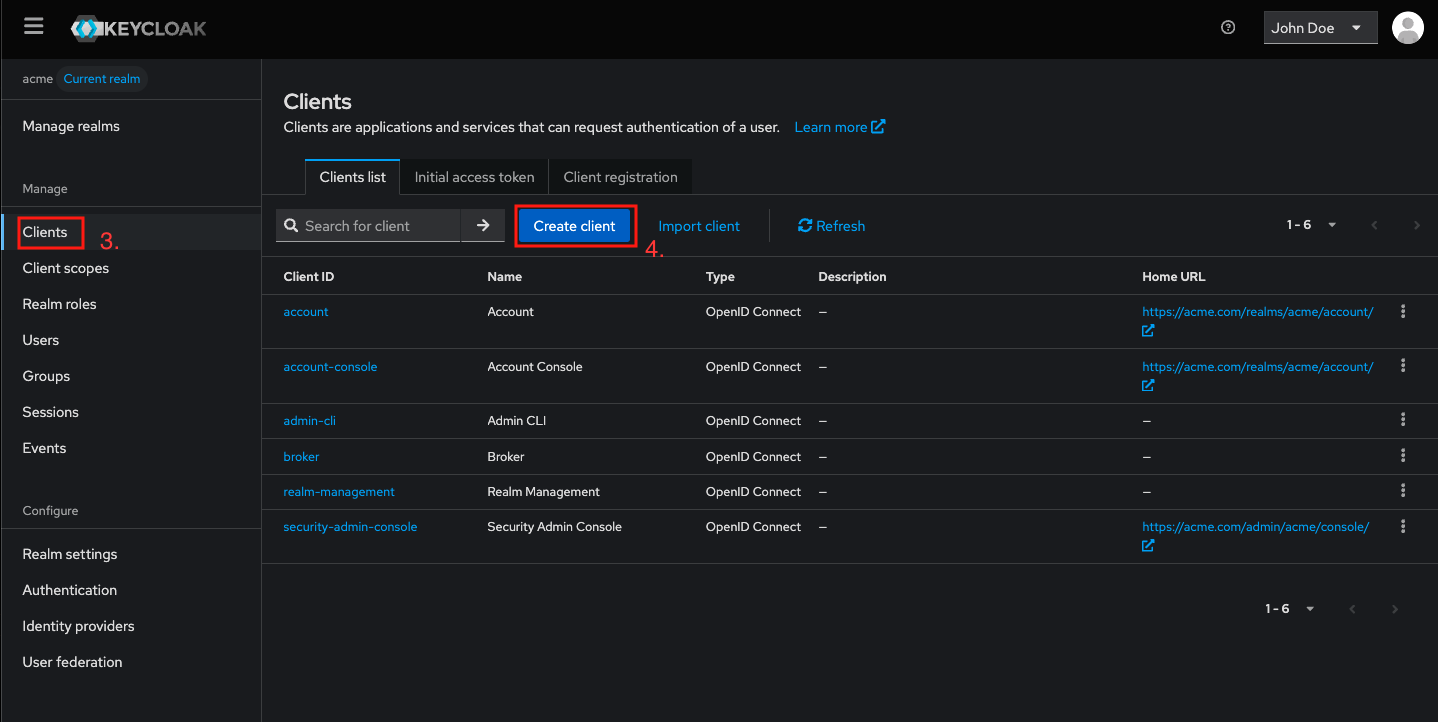
Step 1 - Access Clients section on Keycloak
- Login to your Keycloak as an admin
- Select the realm to be configured (here: acme)
- Navigate to
Clients - Click on
Create client
Step 2 - Configure Service Account in Keycloak
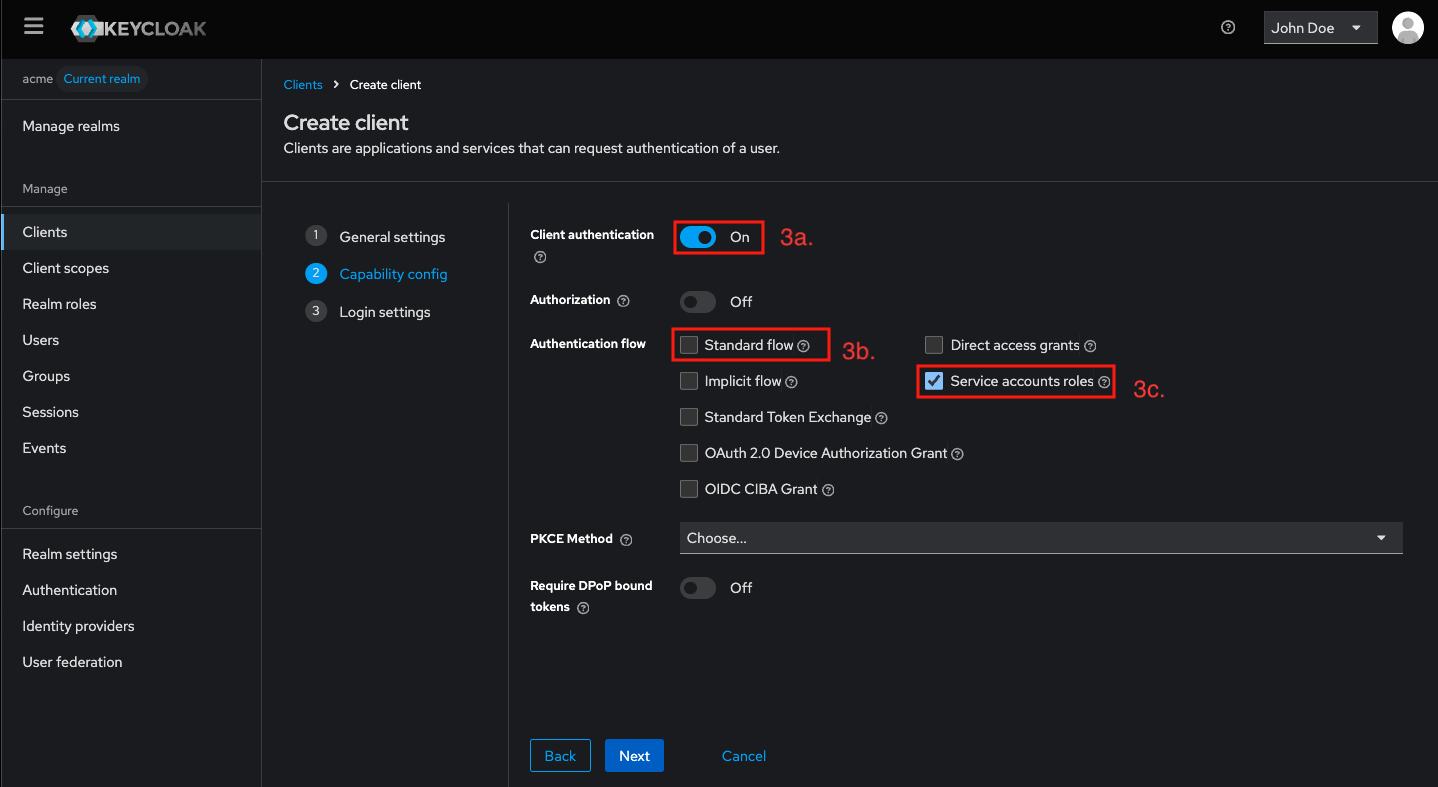
- In General settings step, set the Client ID (here: service-account-events), you may add a description to clarify the purpose of the service account.
- Click
Nextto proceed to step 2 Capability config - Enable
Client authenticationtoggle, DisableStandard flow, and Enable `service accounts roles. (Expected result shown in the screenshot below) - Click
Nextto proceed to step 3 Login settings - Click
Saveto apply the configuration
Keycloak automatically creates a service account user for this client.
Step 3 - Assign Roles to the Service Account
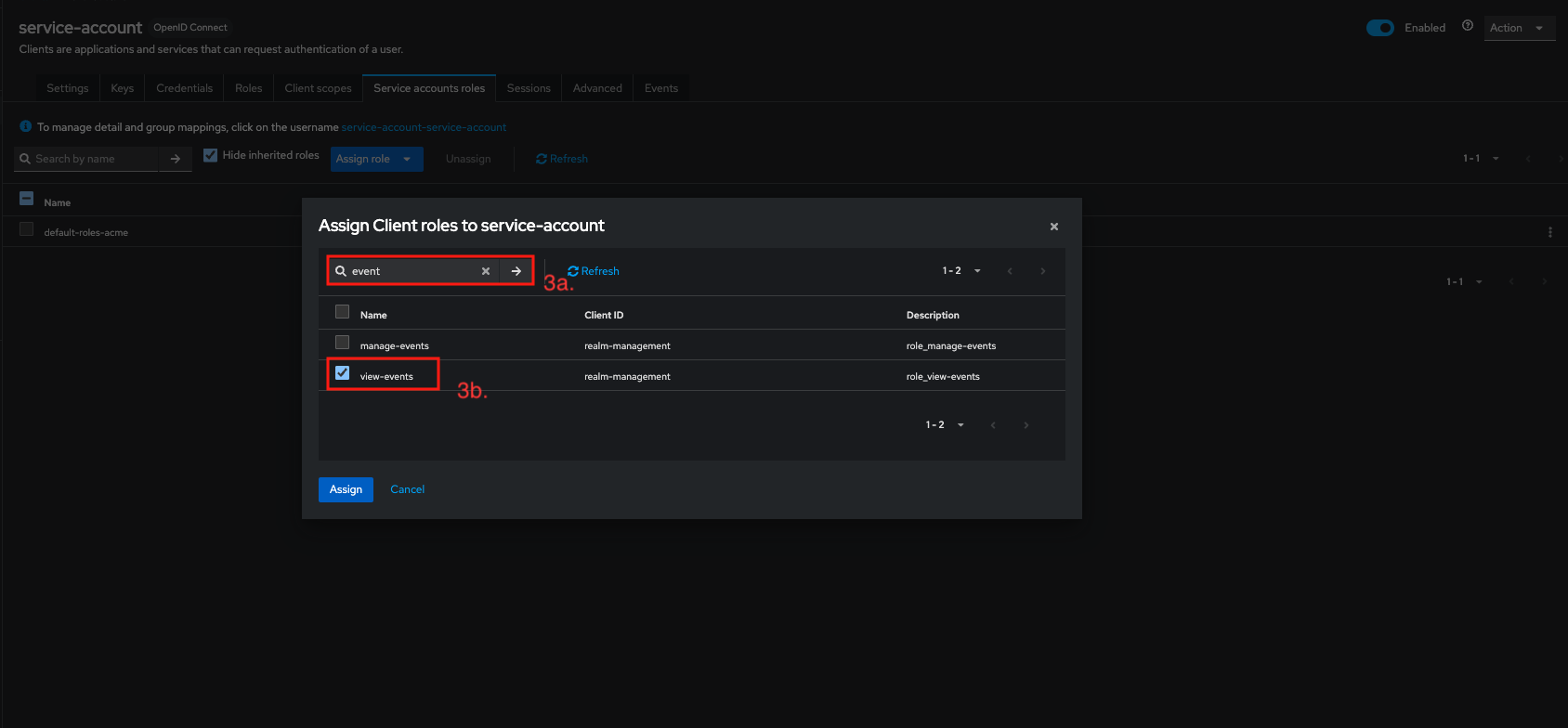
On the client you just created (here: service-account-events) the client window opened
- Click on
Service Account Rolesnav - Select
Assign rolethenClient role - Search for event and select
view-eventsand clickAssign - Save the changes
Your service account is now ready to be used as an event listener.
You can adapt and assign permissions according to your needs.
However, it is recommended to use one service account per use case and to limit its roles as much as possible.
If you want to go further, see the next section: Collecting Keycloak Events, which explains how to retrieve events using the Keycloak APIs with this service account.