
Public Gateway IP
Every dedicated Cloud-IAM deployment sits in its own isolated network, and everything it sends to the outside world leaves through one fixed public IP address: the Public Gateway IP.
You can put that address in a firewall allowlist or a network policy and rely on it. It stays the same for as long as the deployment lives in its current cloud provider and region.
What the Public Gateway IP is
The Public Gateway is how your deployment reaches the outside world. When Keycloak connects to your SMTP relay, your LDAP or Active Directory server, a user storage SPI, an external identity provider, or a webhook endpoint you configured, that connection arrives with the Public Gateway IP as its source address.
It is an outbound address only. It is not what your end users connect to: inbound traffic reaches your deployment through its hostname and the load balancers behind it.
All the Keycloak nodes of a deployment share the same gateway, so there is one source address to allow no matter how many nodes you run.
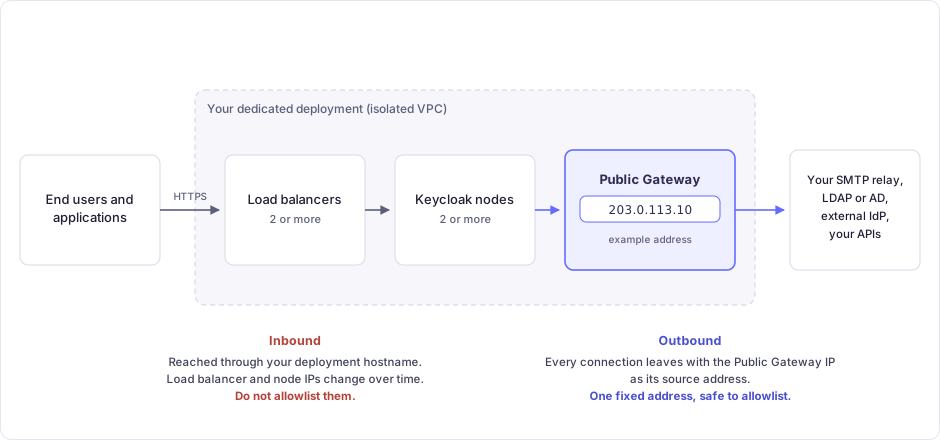
Dedicated deployments get this because they are provisioned in their own VPC. Freemium deployments share infrastructure and have no gateway address of their own. See Plans for the difference.
Where to find your Public Gateway IP
The Cloud-IAM Console shows it in two places:
- On the home page, on the overview card of each deployment, next to the Public gateway IP label.
- On the deployment's Summary page, in the details list, on the Public gateway row, with a copy button.
A value of N/A means the deployment topology has not been reported yet, which normally only happens while a deployment is still being created. If it stays empty on a running dedicated deployment, contact Cloud-IAM Support.
How stable is it
The address is reserved for your deployment and stays the same for the entire life of that deployment in its cloud provider and region.
That comes from the way Cloud-IAM provisions infrastructure. The network layer that owns the gateway and its reserved address is provisioned separately from the layer that owns the Keycloak nodes, the load balancers, and the database. Routine operations only touch the second layer, so they never reach the gateway.
The provisioning pipeline also refuses to apply any infrastructure change whose plan would delete an existing resource. A maintenance operation cannot quietly recreate the gateway and give you a new address.

Operations that do not change the address
None of the following change your Public Gateway IP:
| Operation | Effect on the gateway IP |
|---|---|
| Rolling upgrades and Keycloak version upgrades | Unchanged |
| Deploying, updating, or removing custom extensions | Unchanged |
| Changing environment variables | Unchanged |
| Changing allow lists or rate-limiting rules | Unchanged |
| Theme changes and other customisations | Unchanged |
| Node restart, node replacement, or recovery after a node failure | Unchanged |
| Scaling the deployment up or down | Unchanged |
| Load balancer replacement | Unchanged |
| Database failover, backup, and restore | Unchanged |
| Scheduled and emergency maintenance | Unchanged |
Events that do change the address
The address is released only if the deployment's network is torn down or moved. Three things do that, and you either start them yourself or agree to them beforehand:
- Deleting the deployment. A new deployment gets a new gateway, even if you reuse the same name.
- Migrating the deployment to another cloud provider.
- Migrating the deployment to another region.
Cloud-IAM coordinates provider and region migrations with you and never runs them unannounced. If you have one planned, ask support for the new gateway IP during the migration so you can update your allowlists before the cutover.
Multi-region deployments
A multi-region deployment has a network in each of its regions, so it has one gateway IP per region. Outbound traffic can come from either one, so allow all of them. Ask Cloud-IAM Support for the full list for your deployment.
Using it in an allowlist or a network policy
This is the address Cloud-IAM designates for that purpose. Common places to use it:
- firewall rules and security groups in front of your SMTP relay, LDAP or Active Directory server, or internal APIs
- Kubernetes network policies and cloud provider ingress rules
- IP-restricted allowlists on third party SaaS providers
Allow it as a /32, a single host. Cloud-IAM does not publish a wider range for you to allow, and the addresses around it are not yours.
What you must not allowlist
Do not allowlist your deployment's load balancer IP addresses or Keycloak node IP addresses.
Those addresses are dynamic. Rolling upgrades, node replacements, and maintenance operations replace them, and that replacement is a normal part of running the service. A rule built on them will break without warning after routine maintenance.
Deployment maintenance states this as a customer responsibility.
Recommendations
Keep a list of the systems whose rules reference the gateway IP. A future migration then becomes a short checklist instead of an investigation.
After any migration, read the new value from the Console and update your rules before you decommission the old ones.
An IP allowlist is a useful layer, but do not make it the only control protecting a sensitive endpoint.
If a gateway IP is wired into your firewall rules, tell support. Knowing that lets them flag it during any operation that would affect it.
Related pages
- System Architecture Overview, on how dedicated deployments are isolated.
- Send email via Keycloak (SMTP), the most common use of the gateway IP.
- Allow lists, the inbound counterpart: restricting who can reach your deployment.
- Deployment maintenance, on what changes during maintenance and what does not.